


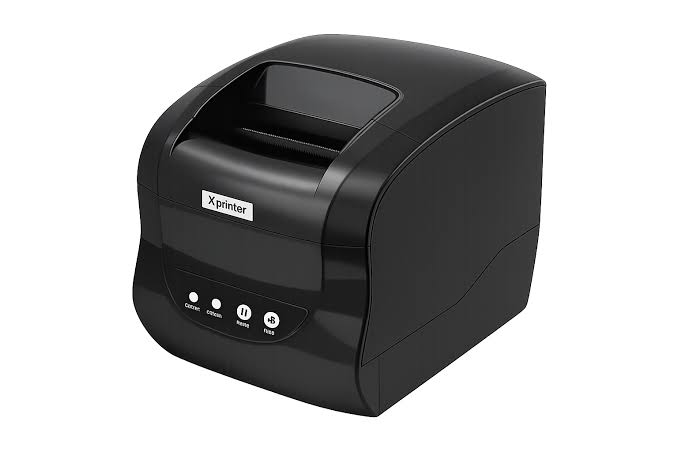
How to Select the Right Paper for an Xprinter Thermal Printer
Choosing the right paper is an important part of maintaining consistent printing quality and reliable printer performance. Thermal printers use heat-sensitive materials to produce text, images, receipts, and labels without conventional ink cartridges or ribbons in direct thermal printing. However, different paper types vary in size, thickness, coating, durability, and intended application. Selecting an unsuitable material can result in faded output, paper jams, poor image clarity, or unnecessary equipment wear.
Before purchasing printing supplies, businesses should understand their printing requirements and check the specifications of their equipment. Whether a printer is used for retail receipts, restaurant orders, shipping labels, or product identification, the paper must be compatible with the device. When selecting paper for an Xprinter Thermal Printer, checking the exact model’s supported media dimensions and material requirements is a practical first step toward achieving dependable results.
Understanding How Thermal Printing Paper Works
Thermal printing paper is specially coated with a heat-sensitive layer. When the printer’s thermal printhead applies controlled heat to the surface, the coating reacts and creates visible text, graphics, or other printed information.
Unlike traditional printing methods, direct thermal printing does not require ink or toner. This makes it useful for businesses that need quick, convenient printing with relatively simple consumable management.
However, thermal paper is not identical across all applications. Receipt rolls and adhesive shipping labels, for example, are designed for different purposes and may require different printer configurations.
1. Identify the Type of Thermal Printing Required
The first step is determining what the printer will produce. The intended application influences the material, format, and durability requirements.
Receipt Printing
Receipt paper is commonly used in supermarkets, restaurants, convenience stores, pharmacies, and other retail environments. It is usually supplied in rolls and is designed for printing transaction details, prices, dates, and business information.
For receipt printing, consider:
- Appropriate roll width.
- Correct roll diameter.
- Suitable paper thickness.
- Consistent surface quality.
- Readable printing and sufficient contrast.
Label Printing
Thermal labels are used for shipping, product identification, inventory management, and barcode applications. They may be supplied as rolls or fanfold stacks, depending on the printer’s supported media format.
Important considerations include label dimensions, adhesive type, liner material, gap spacing, and sensor compatibility.
Ticket and Order Printing
Restaurants, entertainment venues, and service businesses may use thermal printers for order tickets, queue numbers, and transaction records. These applications require paper that feeds consistently and produces clear, readable output.
The selected material should match the printer’s intended use and supported paper specifications.
2. Choose Between Direct Thermal and Thermal Transfer Media
One of the most important distinctions in thermal printing is the difference between direct thermal and thermal transfer technology.
Direct Thermal Paper
Direct thermal paper contains a heat-sensitive coating that changes color when exposed to the printhead’s heat. It does not require a separate ink ribbon.
Common applications include:
- Retail receipts.
- Restaurant order slips.
- Shipping labels designed for direct thermal printing.
- Short-term tracking labels.
- Queue tickets.
Direct thermal media is convenient for applications where printing speed and simple supply management are priorities.
Thermal Transfer Labels
Thermal transfer printing uses heat to transfer ink from a ribbon onto the label surface. It generally requires compatible ribbon and label materials.
This method is often selected when businesses need labels that can withstand more demanding storage or handling conditions.
Users should confirm whether their specific printer supports direct thermal printing, thermal transfer printing, or both. The two media types are not automatically interchangeable.
3. Check the Supported Paper Width and Dimensions
Paper dimensions directly affect printing alignment and feeding performance. Even high-quality paper may cause problems if its size does not match the printer’s supported specifications.
For receipt rolls, check:
- Paper width.
- Maximum roll diameter.
- Core diameter, where specified.
- Paper thickness.
- Available compartment space.
For labels, review:
- Label width and height.
- Gap or black-mark dimensions.
- Roll or stack format.
- Liner dimensions.
- Supported media thickness.
The printer’s technical documentation should be the main reference when selecting these measurements. Avoid assuming that two printers from the same product category support identical paper sizes.
4. Consider Paper Thickness and Material Quality
Paper thickness can influence feeding, handling, and the overall printing experience. Material that is too thick or otherwise outside the supported range may create feeding difficulties.
However, thicker paper is not necessarily better. The ideal thickness depends on the printer’s specifications and the application.
When evaluating thermal paper quality, consider:
- Uniform thickness across the roll.
- Smooth and consistent surface coating.
- Cleanly cut edges.
- Minimal dust or loose particles.
- Reliable paper feeding.
- Consistent print contrast.
For businesses with frequent printing requirements, testing samples before placing a large order can help identify quality differences between suppliers.
5. Evaluate Print Clarity and Thermal Sensitivity
Thermal paper must react appropriately to the heat generated by the printhead. Differences in coating quality and thermal sensitivity can affect the darkness and sharpness of printed information.
Poor-quality material may produce uneven text, weak contrast, or inconsistent results.
What to Check
Print darkness: The paper should produce readable output using suitable printer settings.
Coating consistency: An even coating helps prevent irregular printing across the surface.
Image sharpness: Small text, fine lines, and barcodes should remain clear enough for their intended purpose.
Heat response: The material should respond appropriately to the printer’s supported temperature and speed settings.
A practical approach is to print a sample using the actual printer and inspect it under normal working conditions. For barcode labels, test the sample with the scanners used in the business.
6. Select Paper According to Storage and Environmental Conditions
The environment in which printed information is stored can influence how long it remains readable. Direct thermal prints may gradually fade when exposed to unsuitable conditions.
Factors that can affect printed output include:
- Direct sunlight.
- High temperatures.
- Excessive humidity.
- Friction and repeated handling.
- Contact with certain chemicals or plastic materials.
For short-term receipts, standard thermal paper may be sufficient. However, applications requiring longer record retention should use materials designed for improved image stability and follow the supplier’s storage recommendations.
Businesses should also keep unused thermal paper in a cool, dry place and protect it from direct sunlight.
7. Choose the Appropriate Paper for Barcode Printing
Barcode labels must contain sufficiently clear information for scanners to recognize their patterns. The paper’s coating, surface consistency, and compatibility with the printer can all affect barcode quality.
When selecting barcode media, consider:
- Print contrast.
- Label dimensions.
- Barcode size.
- Material compatibility.
- Adhesive performance.
- Resistance to expected handling conditions.
The printer’s resolution and supported barcode formats also matter. A suitable paper cannot compensate for an incorrectly configured barcode or a design that is too small to scan reliably.
Before adopting a new label material, print several samples and test them with the actual scanning equipment.
8. Consider Adhesive Requirements for Thermal Labels
For businesses using adhesive thermal labels, choosing the right adhesive is just as important as selecting the printable surface.
Different adhesives are designed for different environments and surfaces.
Permanent Adhesive
Permanent adhesive is suitable for labels that should remain attached during normal handling and storage. It is commonly used for product identification, shipping, and inventory labels.
Removable Adhesive
Removable adhesive is useful when labels need to be taken off without leaving significant residue. Retail pricing and temporary identification are common examples.
Specialty Adhesive
Some applications require adhesives designed for challenging surfaces, temperature conditions, or specific handling environments. These materials should be selected according to the label supplier’s technical guidance.
The adhesive must be appropriate for the surface receiving the label, not just the printer producing it.
9. Review Paper Roll Construction and Winding Quality
Paper roll construction can influence how smoothly the material moves through the printer. Poorly wound rolls may create uneven feeding, loose edges, or alignment problems.
Before purchasing receipt rolls, inspect:
- Whether the roll is wound evenly.
- Whether the edges are clean.
- Whether the core fits the supported holder.
- Whether the roll diameter is within the printer’s limit.
- Whether the paper surface is free from visible contamination.
For high-volume businesses, consistent roll construction can help reduce interruptions and simplify supply management.
10. Compare Paper Costs with Overall Printing Value
Price is an important purchasing consideration, especially for businesses that print hundreds or thousands of receipts and labels each day. However, choosing the cheapest material may not always provide the best long-term value.
Low-quality paper can lead to poor print results, wasted materials, repeated printing, and additional maintenance.
When comparing suppliers, evaluate:
- Cost per roll or label.
- Material quality.
- Consistency between batches.
- Compatibility with the printer.
- Available order quantities.
- Delivery reliability.
- Supplier support and product information.
Testing samples before bulk purchasing can help businesses balance cost with dependable performance.
11. Common Mistakes to Avoid When Buying Thermal Paper
Selecting unsuitable paper can create problems even when the printer itself is functioning correctly.
Some frequent purchasing mistakes include:
- Ignoring printer specifications: Buying paper based only on appearance or price may result in incompatible dimensions.
- Confusing direct thermal and thermal transfer materials: These technologies use different printing methods and consumables.
- Overlooking paper thickness: Material outside the supported range may affect feeding.
- Choosing unsuitable label adhesives: An adhesive that does not match the application may cause labels to peel or leave residue.
- Ignoring storage requirements: Poor storage conditions can reduce the quality of thermal paper and printed images.
- Skipping sample tests: A paper roll that looks suitable may still produce inconsistent results in actual use.
- Focusing only on purchase price: Material quality and printing consistency should also influence purchasing decisions.
Avoiding these mistakes can make paper selection more efficient and reduce unnecessary operating issues.
12. How to Test Paper Before Making a Bulk Purchase
A sample test allows businesses to evaluate paper compatibility before committing to a large order. This is especially useful when changing suppliers or introducing a new paper type.
A simple testing process includes:
Step 1: Confirm compatibility. Compare the material’s dimensions, thickness, and type with the printer’s documentation.
Step 2: Load the sample correctly. Follow the manufacturer’s paper-loading instructions.
Step 3: Print a test document. Use representative content, such as receipt text, logos, graphics, or barcode labels.
Step 4: Inspect print quality. Check darkness, sharpness, alignment, and consistency.
Step 5: Test paper feeding. Run several printing jobs to identify feeding problems or jams.
Step 6: Evaluate practical durability. For labels and longer-term records, check whether the material suits the expected handling and storage conditions.
Step 7: Compare suppliers. Evaluate the samples based on quality, cost, consistency, and delivery requirements.
This process helps businesses make purchasing decisions based on actual performance rather than product descriptions alone.
Conclusion
Selecting the right paper for a thermal printer involves more than choosing a roll or label with a suitable price. Businesses need to consider printing technology, dimensions, material quality, thermal sensitivity, adhesive requirements, storage conditions, and the intended application.
The most reliable starting point is always the printer’s model-specific documentation. After confirming compatibility, testing sample materials can help identify options that deliver clear printing, consistent feeding, and appropriate durability. By making informed paper choices, businesses can reduce printing interruptions, manage consumable costs, and maintain dependable daily operations.