


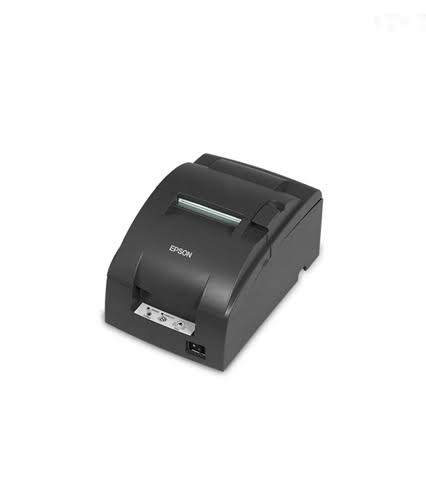
The Role of Receipt Printers in Modern Point-of-Sale Systems
Modern point-of-sale (POS) systems have become essential tools for businesses that manage customer transactions, process payments, and monitor sales activities. These systems combine hardware and software to support checkout operations, organize transaction information, and improve communication between different business functions. Among the important hardware components is the receipt printer, which provides customers with physical records of completed purchases and helps businesses maintain consistent transaction documentation.
A reliable Receipt Printer works alongside POS terminals, payment devices, and business software to complete the checkout process efficiently. Its role extends beyond producing paper receipts, as it can support order processing, returns, customer service, and daily recordkeeping. Understanding how receipt printers fit into modern POS environments helps businesses build more organized and dependable transaction systems.
1. Understanding Receipt Printers in POS Systems
A receipt printer is a peripheral device that receives transaction information from a POS terminal or connected software and converts it into a printed document. Depending on the system configuration, a receipt may contain product descriptions, quantities, prices, taxes, discounts, payment details, and transaction references.
In a typical checkout process, the POS software calculates the transaction total and sends the relevant information to the printer after payment is completed. The printer then produces a receipt for the customer or business.
This automated process reduces the need for handwritten transaction records and helps maintain consistent document formatting.
2. Supporting Faster Checkout Operations
One of the main functions of a receipt printer is to help businesses complete transactions without unnecessary delays. Modern thermal printers can produce receipts quickly, allowing employees to finalize purchases and serve customers more efficiently.
This capability is particularly valuable in businesses with frequent transactions, such as:
- Supermarkets and grocery stores
- Convenience shops
- Restaurants and cafés
- Pharmacies
- Retail chains
- Ticketing and service counters
During peak hours, even small improvements in printing speed can contribute to a smoother checkout experience. When combined with efficient POS software and payment processing equipment, receipt printing becomes part of a coordinated transaction workflow.
3. Integration with POS Software
Receipt printers depend on communication with POS software to receive and process print jobs. This integration allows transaction information to move directly from the checkout system to the printing device.
The software typically controls receipt content, including item descriptions, totals, taxes, discounts, and business information. Some systems also support customized layouts that display promotional messages, return policies, or customer service details.
Important Integration Requirements
Businesses should evaluate several compatibility factors before connecting a printer to their POS system:
- Supported operating systems
- Available printer drivers
- Compatible printing commands
- USB, Ethernet, Bluetooth, or Wi-Fi interfaces
- Receipt formatting capabilities
- Compatibility with the POS application
Proper integration helps reduce configuration problems and ensures that receipts display transaction information correctly.
4. Connecting with Payment Processing Systems
Modern POS environments often combine receipt printers with payment terminals that accept cashless transactions. These systems may support credit cards, debit cards, contactless payments, and compatible digital payment methods.
After a payment is processed, the POS software can send transaction details to the receipt printer. Depending on the configuration, the printed document may include the payment method, transaction reference, total amount, and other relevant information.
This connection helps businesses provide consistent purchase documentation across different payment methods. However, the printer itself does not authorize payments; that function is handled by the payment terminal and associated processing system.
5. Improving Transaction Accuracy
Manual receipt preparation can introduce mistakes, particularly in businesses with frequent purchases and complex pricing structures. Employees may accidentally record incorrect amounts, omit product details, or calculate totals incorrectly.
Integrated POS printing helps reduce these risks because the receipt is generated using information already stored in the transaction system.
For example, when a cashier scans several products, the POS software calculates the subtotal, applies relevant discounts, and determines the final amount. The printer then produces a receipt using those system-generated details.
This process supports consistency, although businesses must still maintain accurate product data, pricing information, and POS configurations.
6. Supporting Sales Records and Business Documentation
Receipts provide a record of individual purchases and can help businesses review transaction details when necessary. Modern POS systems often combine printed receipts with digital transaction storage, allowing managers to access sales information through reporting tools.
These records can support activities such as:
- Reviewing daily sales totals
- Checking individual transactions
- Investigating payment discrepancies
- Processing returns and exchanges
- Monitoring discounts and promotions
- Maintaining accounting documentation
The printed receipt gives customers a physical purchase record, while the digital POS record supports internal tracking and reporting.
7. Helping Manage Returns and Exchanges
Returns and exchanges are common parts of retail operations. Receipt printers support these processes by producing documents that include transaction dates, product descriptions, prices, and reference numbers.
When a customer requests a return, employees can use the printed receipt or retrieve the corresponding transaction from the POS system. This helps them verify purchase details and follow the business’s return policy.
Clear transaction documentation can reduce confusion and make after-sales service more organized. Businesses should also ensure that their POS software records return transactions correctly so that sales and inventory information remain accurate.
8. Supporting Inventory Management Workflows
Receipt printers contribute indirectly to inventory management through their connection with POS software. When a product is sold, the POS system can update stock records according to its configured inventory functions.
Managers can then use sales reports to identify frequently purchased products, review stock movement, and plan replenishment.
For example, a grocery store may examine transaction data to identify products with high sales volumes. This information can help staff coordinate purchasing decisions and maintain suitable stock levels.
The printer does not directly manage inventory, but it supports the transaction process that generates useful sales information.
9. Different Receipt Printer Technologies in POS Environments
Not every POS system requires the same type of printer. The appropriate technology depends on the business’s document requirements, transaction volume, and operating environment.
Thermal Receipt Printers
Thermal printers use heat to create text and graphics on specially coated paper. They are widely used in modern POS systems because they offer fast printing, quiet operation, and no requirement for traditional ink cartridges or ribbons.
They are commonly found in supermarkets, retail stores, restaurants, and service counters.
Impact Receipt Printers
Impact printers use pins that strike an ink ribbon against paper. Although they are generally louder and slower than thermal models, they can support multipart forms.
Restaurants may use compatible impact printers for kitchen order slips, while other businesses may use them for specialized transaction documents.
Mobile Receipt Printers
Mobile printers are compact devices that often use thermal technology and wireless connections. They can connect to compatible smartphones, tablets, and handheld POS terminals.
These printers are useful for delivery services, outdoor vendors, field operations, and businesses that process payments away from fixed checkout counters.
10. The Importance of Connectivity in Modern POS Systems
Connectivity determines how receipt printers communicate with other POS components. The correct interface can improve installation flexibility and help businesses organize their equipment.
USB: Provides a direct wired connection to a computer or POS terminal. It is commonly suitable for individual checkout stations.
Ethernet: Connects printers to a local network, allowing compatible terminals to send print jobs through the network.
Bluetooth: Supports wireless communication with compatible mobile devices and is frequently used with portable printers.
Wi-Fi: Allows printers to connect through a supported wireless network, providing flexibility in equipment placement.
Businesses should select connectivity options based on their POS infrastructure, network arrangements, and expected number of connected devices.
11. Customizing Receipts for Business Requirements
Modern POS software often allows businesses to customize the information displayed on printed receipts. This can help improve document clarity and provide customers with relevant business information.
Depending on the printer and software capabilities, receipts may include:
- Business name and contact information
- Transaction date and time
- Product names and quantities
- Prices, taxes, and discounts
- Payment details
- Return and exchange policies
- Promotional messages
- Barcodes or QR codes
Customization should focus on useful information rather than unnecessary content. Clear formatting makes receipts easier for customers to read and employees to review.
12. Improving Efficiency Across Different Industries
Receipt printers support different operational requirements depending on the industry.
Retail and Supermarkets
Retail businesses use receipt printers to document purchases, support returns, and provide customers with transaction details. High-speed thermal models are particularly useful at busy checkout counters.
Restaurants and Cafés
Hospitality businesses may use separate printers for customer bills and kitchen orders. Network-connected models can help route orders from multiple POS terminals to designated preparation areas.
Healthcare Facilities
Clinics, pharmacies, and other healthcare service providers may use receipt printers for payment records and service documentation. Printer compatibility with the relevant billing software is an important consideration.
Transportation and Ticketing
Transportation providers and ticketing counters may use stationary or mobile printers to produce payment confirmations, transaction records, and other printed documents.
Small Service Businesses
Salons, repair shops, and professional service providers can use compact POS printers to issue receipts and maintain consistent payment documentation.
13. Maintenance and Reliability in POS Operations
A receipt printer must remain dependable to support uninterrupted checkout activities. Paper-feed problems, dirty print heads, worn cutters, or connection errors can interrupt transaction processing.
Regular maintenance helps reduce these issues. Businesses should follow manufacturer recommendations and perform basic care, including:
- Cleaning the print head when required
- Removing paper dust and debris
- Using compatible paper rolls
- Checking the paper-loading mechanism
- Inspecting automatic cutters where applicable
- Updating drivers or firmware when necessary
Staff should also understand basic troubleshooting procedures, such as checking power connections, confirming paper orientation, and reviewing printer status indicators.
14. Choosing the Right Receipt Printer for a POS System
Selecting a suitable printer requires evaluating both technical specifications and everyday business needs.
Important factors include printing speed, output quality, supported paper width, connectivity, physical size, and expected operating volume. Businesses should also verify compatibility with their existing POS software and payment equipment.
Long-term considerations are equally important. Paper costs, replacement components, warranty coverage, maintenance requirements, and technical support can influence the overall value of a printer.
A small retail shop may need a simple USB thermal model, while a larger business may benefit from network-connected equipment that supports several checkout terminals. The best option is the one that fits the actual transaction workflow rather than simply offering the largest number of features.
Conclusion
Receipt printers remain important components of modern point-of-sale systems. They help businesses complete transactions, provide customers with purchase documentation, support returns, and maintain organized sales records. When integrated with compatible POS software and payment equipment, they contribute to a more consistent and efficient checkout process.
As businesses adopt mobile payments, network-connected devices, and increasingly flexible POS solutions, receipt printing technology continues to support different transaction environments. By selecting suitable printing technology, connectivity, and maintenance arrangements, businesses can build reliable POS systems that meet their operational requirements.