


Why Thermal Printers Are Widely Used in Point-of-Sale Systems
Point-of-sale (POS) systems play an essential role in modern retail and service businesses. They help process payments, record transactions, manage sales information, and support daily customer interactions. Alongside POS terminals and payment devices, receipt printers are important components that ensure customers receive clear records of their purchases. Among the available printing technologies, thermal printing has become a popular choice because of its speed, convenient operation, and suitability for frequent transaction processing.
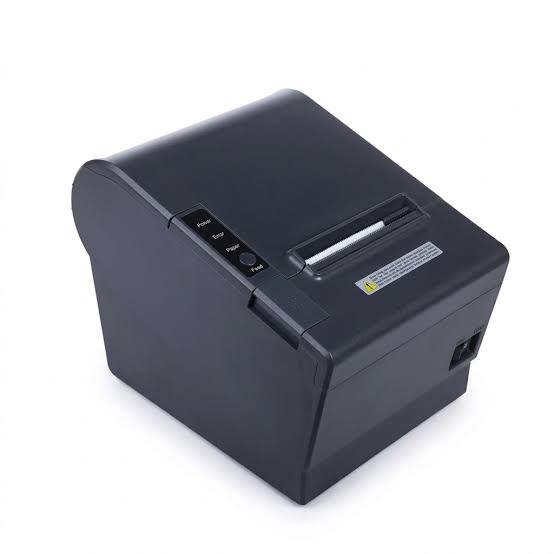
A Thermal Printer uses heat to produce text, graphics, and other information on compatible printing materials. In POS environments, these devices are commonly used to generate receipts, order tickets, and transaction records. Their compact designs and ability to work with compatible POS software make them suitable for businesses that need dependable printing throughout the day.
1. Fast Receipt Printing
Speed is one of the main reasons thermal printers are widely used in POS systems. Retail stores, restaurants, supermarkets, and other businesses often process numerous transactions within short periods. Slow receipt production can increase waiting times and interrupt checkout activities.
Thermal receipt printers can produce transaction records quickly after receiving information from the POS terminal. This allows employees to complete the payment process and provide customers with printed receipts without unnecessary delays.
Faster printing is particularly useful during busy shopping hours, seasonal promotions, and other periods when transaction volumes increase.
2. Consistent Print Quality
POS receipts must contain readable information, including product descriptions, prices, taxes, payment details, and transaction numbers. Poor print quality can make receipts difficult to understand and create problems when customers need them for returns or exchanges.
Thermal printing technology can produce clear text, logos, and supported graphics when the printer is correctly configured and compatible paper is used.
Consistent output helps businesses maintain professional transaction records while making essential purchase information easier for customers to review.
3. Reduced Need for Ink and Toner
Direct thermal receipt printers do not require conventional ink or toner cartridges. Instead, they use heat-sensitive paper to create printed content.
This simplifies consumable management for businesses that generate large numbers of receipts. Employees do not need to monitor ink levels or replace cartridges during routine printing operations.
However, businesses must still purchase compatible thermal paper rolls. Paper quality, roll dimensions, and storage conditions should be considered when estimating ongoing operating expenses.
4. Compact Designs for Checkout Counters
Space is often limited at retail checkout counters. POS workstations may already contain computers, payment terminals, barcode scanners, cash drawers, and other equipment.
Many thermal receipt printers feature compact designs that can fit conveniently into these environments. Their relatively small footprint helps businesses organize workstations without using excessive counter space.
Some models also support different installation arrangements, allowing retailers to select equipment that matches their available workspace.
5. Easy Integration with POS Software
Modern POS systems use software to manage sales transactions, calculate totals, apply discounts, and record payment information. A compatible thermal printer can connect to this software and receive printing instructions automatically.
After a transaction is completed, the POS application can send the receipt information directly to the printer. This reduces the need for employees to prepare transaction records manually.
Before purchasing a printer, businesses should verify its compatibility with their POS software, operating system, communication interface, and available drivers.
6. Lower Routine Maintenance Requirements
Businesses depend on POS equipment throughout their operating hours, so complicated maintenance procedures can create unnecessary interruptions.
Direct thermal receipt printers generally have fewer consumable components than conventional ink-based printers used for similar receipt-printing tasks. Routine maintenance commonly involves:
- Cleaning the thermal printhead
- Removing paper dust and debris
- Checking the paper-feeding mechanism
- Inspecting cables and connections
- Replacing worn components when necessary
Following the manufacturer’s maintenance instructions can help preserve print quality and reduce avoidable equipment problems.
7. Reliable Performance for High-Volume Transactions
Businesses with busy checkout areas need printing equipment that can handle frequent use. Supermarkets, department stores, restaurants, and convenience stores may produce hundreds or thousands of receipts during normal operating periods.
A thermal printer selected for the expected workload can support consistent transaction processing. Businesses should review specifications such as print speed, recommended duty cycle, printhead life, and automatic cutter performance.
Choosing equipment with suitable capacity helps reduce interruptions during peak business hours.
8. Flexible Connectivity Options
POS systems use different hardware configurations, so connectivity is an important purchasing consideration. Thermal receipt printers are available with several communication options, depending on the model.
Common interfaces include:
USB: Provides a straightforward connection to compatible POS terminals and computers.
Ethernet: Allows supported printers to connect to a local network and receive print jobs from networked systems.
Bluetooth: Supports compatible mobile POS devices and wireless checkout arrangements.
Wi-Fi: Enables printing over supported wireless networks, offering flexibility in certain retail environments.
Serial interfaces: May be required for older POS equipment or specialized business systems.
Businesses should select connectivity options that match their existing infrastructure and confirm compatibility before installation.
9. Support for Different Retail and Service Environments
Thermal printers are used in a wide range of businesses because POS printing requirements extend beyond traditional retail stores.
Common applications include:
- Supermarkets: Printing customer receipts after purchases and payment processing.
- Restaurants: Producing order tickets and payment receipts.
- Convenience stores: Supporting frequent, quick transactions.
- Clothing stores: Generating receipts and transaction records for purchases and returns.
- Hotels: Printing billing statements and payment confirmations.
- Pharmacies: Producing transaction receipts and other supported records.
This flexibility makes thermal printing technology suitable for businesses with different transaction volumes and service requirements.
10. Support for Barcode and QR Code Printing
Many POS receipts contain more than basic transaction details. Businesses may include barcodes, QR codes, promotional information, loyalty references, or links to digital services.
Compatible thermal printers can reproduce these elements when the POS software and printer settings are configured correctly.
Barcodes may help employees retrieve transaction information or process returns, while QR codes can direct customers to digital receipts, feedback pages, or loyalty programs.
For reliable scanning, businesses should use appropriate print settings and test the output with their actual scanning devices.
11. Improved Customer Checkout Experience
The checkout process is one of the most frequent points of interaction between customers and retail businesses. Delays, unclear receipts, and equipment problems can affect customer satisfaction.
Thermal printers contribute to a smoother checkout experience by producing transaction records quickly and consistently. Their integration with POS systems also helps employees complete payment procedures without switching between separate manual printing processes.
Although customer satisfaction depends on many factors, dependable receipt printing supports a more organized checkout workflow.
12. Potential Cost Advantages Over Time
Thermal printing can help businesses manage certain operating expenses, especially when direct thermal technology eliminates the need for ink or toner cartridges.
However, the overall cost depends on the printer model, paper consumption, maintenance requirements, and expected workload.
Businesses should evaluate:
- Initial equipment purchase price
- Thermal paper costs
- Printhead and cutter replacement expenses
- Maintenance requirements
- Expected operating lifespan
- Potential costs associated with equipment downtime
Comparing these factors provides a clearer understanding of the long-term financial impact of adopting thermal printing technology.
13. Support for Modern Mobile POS Systems
Retail businesses increasingly use tablets, smartphones, and portable payment terminals to support flexible checkout arrangements. Some thermal printers offer Bluetooth or Wi-Fi connectivity that allows compatible mobile devices to send print jobs.
This can be useful for restaurants taking orders at tables, temporary retail counters, market vendors, and businesses that operate outside traditional checkout areas.
Portable thermal printers can also support field-based transactions where employees need to provide printed records immediately after completing a payment.
Before selecting a wireless model, businesses should check supported devices, operating systems, connection stability, and battery capacity where applicable.
Factors to Consider When Choosing a Thermal POS Printer
Although thermal printers offer several benefits, not every model is suitable for every POS environment. Businesses should evaluate their requirements before purchasing equipment.
Important factors include:
- Print speed: Select a model that can handle the expected number of transactions.
- Paper compatibility: Confirm the supported paper width, roll size, and media specifications.
- Connectivity: Check whether the printer supports the interfaces used by the POS system.
- Print quality: Ensure receipts contain clear text, logos, and scannable codes.
- Build quality: Consider the durability of the printhead, cutter, and housing.
- Software compatibility: Verify driver support and integration with existing POS applications.
- Maintenance and support: Review warranty coverage, replacement parts, and technical assistance.
Testing the printer with the actual POS system can help identify compatibility issues before deploying it across multiple checkout stations.
Conclusion
Thermal printers are widely used in point-of-sale systems because they offer fast receipt production, consistent print quality, compact designs, and convenient integration with compatible business software. Their ability to operate without ink or toner in direct thermal applications also simplifies routine consumable management.
From supermarkets and restaurants to hotels and small retail stores, these devices support everyday transaction processing and customer service. By considering printing volume, connectivity, media compatibility, durability, and operating costs, businesses can select a thermal POS printer that meets their requirements and supports efficient checkout operations.